Documentation
API endpoints
| Purpose | Suggested (RESTful) |
|---|---|
| Create short-lived token | POST /v1/tokens |
| Get verification result | GET /v1/tokens/{token} |
Token rules
- Issued with
api_keyheader from client backend. - Short lifetime: 120 seconds.
- Single-use only — mark token consumed after fetching verification result.
- Never expose
api_keyto browsers.
Integration flow
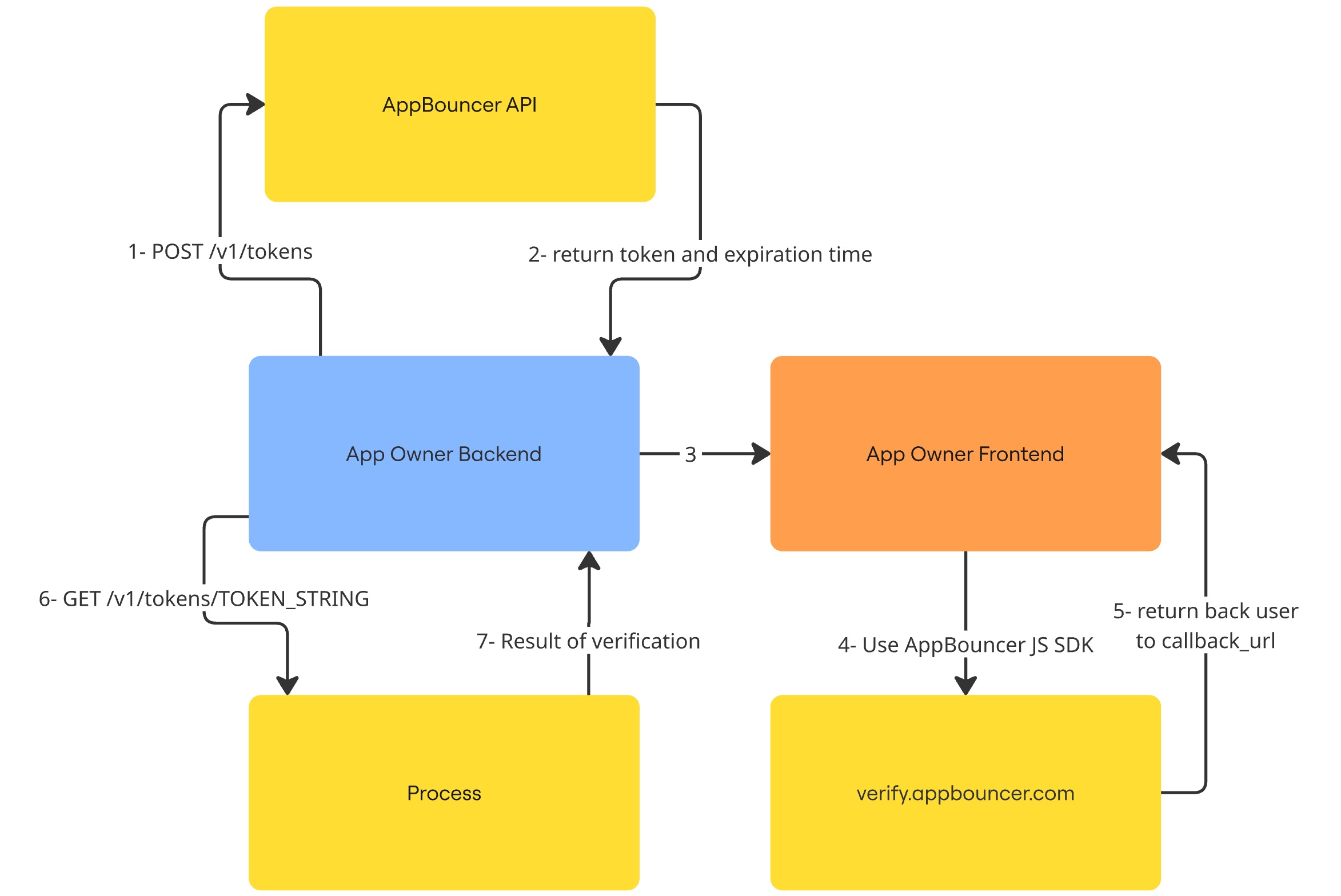
Sequence of events:
- Your backend requests a short-lived token from AppBouncer.
- Backend returns token to your frontend (or server-side renders it into page).
- Frontend initializes the AppBouncer SDK and calls
verify(), which redirects the user to AppBouncer with the token and callback URL. - User completes verification on
verify.appbouncer.com. - AppBouncer redirects user back to your
callback_urlwith?token=GENERATED_TOKEN. - Your backend calls AppBouncer:
GET /v1/tokens/GENERATED_TOKENto fetch verification result.
Quick API examples
Request token (server-side)
// curl example
curl -X POST "https://api.appbouncer.com/v1/tokens" -H "api_key: YOUR_API_KEY"

# response
# { "token": "abc123", "expires_in": 120, "generated_at": "2025-01-10T12:00:00Z" }
Frontend SDK
(function (global) {
                        function AppBouncer(options) {
                            if (!options) throw new Error('AppBouncer: options required');
                            this.token = options.token;
                            this.callbackUrl = options.callbackUrl;
                            this.backendUrl = options.backendUrl || 'https://verify.appbouncer.com';
                        }

                        AppBouncer.prototype.verify = function () {
                            if (!this.token) {
                                this.onError(new Error('token_missing'));
                                return;
                            }
                            const url = new URL((this.backendUrl || '') + '/verify');
                            url.searchParams.set('token', this.token);
                            url.searchParams.set('callback_url', this.callbackUrl);

                            window.location.href = url.toString();
                            return;
                        };

                        // Expose
                        global.AppBouncer = AppBouncer;
                    })(window);
Usage:
const a = new AppBouncer({
callbackURL: 'https://waptap.com/user-age-verification',
token: '<token-from-your-server>'
});
a.verify();
Callback handling & verification
When user is redirected back to https://your-callback-url?token=..., do not trust the client. Your backend must call AppBouncer to fetch the canonical verification result.
// Example: server-side verification (curl)
                    curl "https://api.appbouncer.com/v1/tokens/GENERATED_TOKEN"                     -H "api_key: YOUR_API_KEY"

                    // Example response
                    {
                    "status": "verified",
                    "age": 22,
                    "verified_at": "2025-01-10T12:00:15Z"
                    }
Errors to handle:
token_missingtoken_expiredinvalid_callback_urlverification_failed
Security checklist
- Do not ship
api_keyto client-side. - Validate callback URLs against a whitelist on your backend.
- Mark tokens consumed on first verification fetch to prevent replay.
- Log verification events with timestamps and IPs for audit.